How to Build a GEO Workflow That Makes Your Content LLM-Ready
Learn how to build a GEO workflow that keeps your content visible, quotable, and LLM-ready across AI-driven search platforms like ChatGPT, Gemini, and Perplexity.



Generative search behavior is already spiking. Capgemini Research Institute reports that 58% of consumers now use GenAI tools to search for products or services, up from 25% in 2023.
Tools like ChatGPT, Gemini, and Perplexity surface content based on patterns, formatting, and conceptual relationships, not just keywords or backlinks. That’s where generative engine optimization (GEO) comes in. GEO helps you create content that large language models (LLMs) can find, understand, and quote.
Tactics vary. Backlinko frames GEO as optimizing content for better visibility in LLM-generated results. iPullRank sees it as adapting SEO for changing search behavior.
Either way, the goal is the same: build content that earns visibility across AI-powered platforms. Making this process repeatable across every piece of content takes a workflow.
This guide is built for content marketers, editors, and strategists managing multi-asset workflows, especially if you’re creating thought leadership, educational hubs, or product-led content. No technical SEO background required.
You’ll get a step-by-step workflow to apply GEO across your content, from briefs and formatting to measurement. Plus, a free template to get started faster.
You can follow these steps manually, or run them inside Relato’s GEO Workflow — a built-in system that automates task assignment, brief creation, and review steps from start to finish.
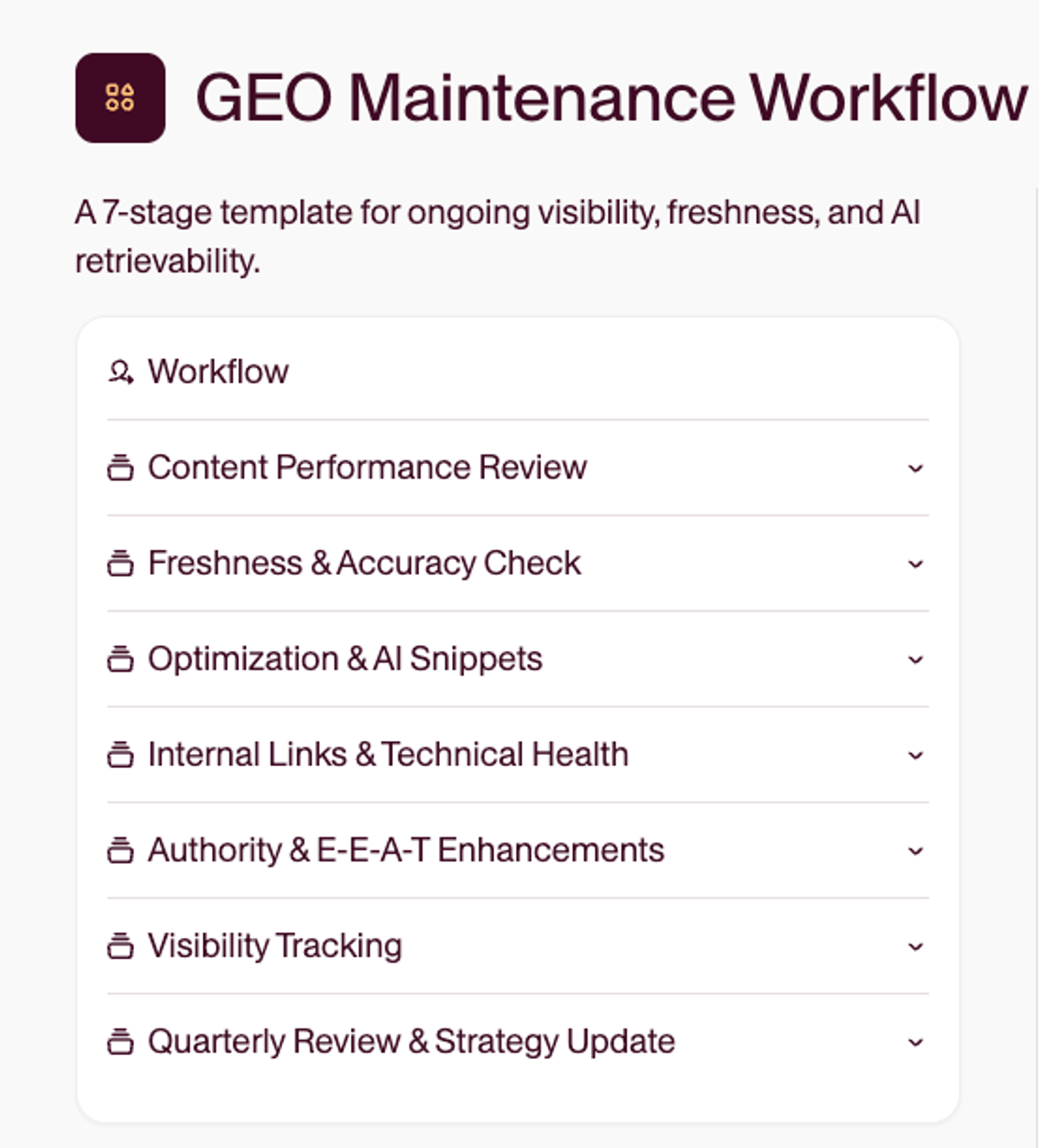
How does GEO work in a content workflow?
GEO works by shaping content so a language model can find it, understand it, and quote it back inside an answer. Traditional SEO earns you a ranked link. GEO earns you a citation inside the response itself.
That shift changes where the work happens. In an SEO workflow, you optimize for a crawler and a results page: keywords, titles, backlinks. In a GEO workflow, you optimize for retrieval and extraction: clear definitions, self-contained sections, and formatting a model can lift without mangling the meaning. Most of the quality work overlaps. GEO adds a layer of passage-level clarity on top of it.
The mechanic underneath is worth understanding, with one caveat. Retrieval systems generally pull passages rather than whole pages, and a self-contained passage under a plain heading survives that better than the same answer scattered through a long paragraph. The caveat is that the specifics differ by system and change often, and Google says directly that you do not need to break content into small pieces for AI to understand it. Write for a reader who is skimming, and the retrieval case takes care of itself.
Here is a worked example of GEO applied to a real page. Say you publish a guide on email onboarding, and someone asks ChatGPT, “how do I cut churn in the first week?” A GEO-ready version puts that answer in its own section, “How to reduce first-week churn,” states the tactic in the first sentence, and backs it with a specific number. The model retrieves that block and cites you. A non-optimized version scatters the same advice across three paragraphs, and the model quotes a competitor instead.
Everything below turns that into a repeatable process, from the brief to the measurement loop.
1. Create briefs that support GEO from the start
GEO starts at the brief stage. If your team isn’t aligned on what question you’re answering and how you want to appear in LLMs, it’s easy to miss the mark.
Here’s what to include:
Target query or prompt: Define the core phrase, question, or use case the piece is meant to answer.
Working title and meta description: Help anchor the focus and reflect natural prompts.
Concepts that need to be clearly defined: Highlight must-include definitions or terminology.
Internal links to include: Identify related content to link from or link to.
Competitor or source comparisons: Flag pages you want to improve upon or position against.
Structural components: FAQs, how-to steps, checklists, or glossary entries — anything an LLM can easily extract and incorporate into answers.
External sources or research to reference: Add any stats, studies, or industry examples that support your POV.
Technical details: Note any structured data the page needs, and confirm nothing is blocking AI search crawlers from reaching it.
You can use a doc or spreadsheet to track these fields, but templates help standardize the process. In Relato, you can turn this into a reusable Brief Template that connects directly to the GEO Workflow, automatically assigning tasks and linking reviewers.
Try this: Download our free brief template to make this step easy, or use our Content Brief Assistant to set everything up for you.
2. Map your process from brief to publish
Once the brief is done, move straight into production. Adopt a defined workflow to avoid missing deadlines, delaying handoffs, or letting review cycles stretch longer than they should.
Use this sample sequence to structure your GEO process:
Brief created
Outline approved
Draft written
Editorial and SEO review
Final copy approved
CMS upload and formatting
Publish
Add to internal index
You can assign each step manually or automate the full workflow with AI. In Relato, teams convert briefs into workflows in one click, with pre-assigned tasks and deadlines.
Tip: Build a reusable workflow in Relato that auto-assigns tasks, links back to the brief, and includes deadlines and review steps from day one. Learn how to automate it here.
3. Format your content to be LLM-friendly
Formatting shapes how your content is read and referenced. LLMs prioritize clarity and organization. Before you publish, make sure the draft is easy to parse and pull from.
To do that:
Use short paragraphs and clear headers
Separate key definitions, FAQs, and how-to steps
Add lists or tables where appropriate
Avoid cramming multiple ideas into a single section
Keep one idea per section or block
Tip: Add a formatting check to your review stage so every piece gets a pass for clarity, headers, and extractable structures before publishing.
A caution on schema, because the advice here has aged badly. Google removed the How-to rich result in 2023 and stopped showing FAQ rich results in May 2026, and it now states plainly that no special markup is required for its generative features. An on-page FAQ still earns its place by answering real questions and widening the queries a page can serve. Treat it as something you do for readers, not as a ranking or citation lever.
For more formatting tips and the why behind them, check out the explainer below.
How LLMs read your content
LLMs process language differently than humans. To format content effectively, it helps to understand how LLMs actually read, split, and prioritize your content behind the scenes.
Tokenization: breaking your words into pieces
LLMs break everything into tokens — small language units that might be a whole word, part of a word, or punctuation.
Example: The sentence “Email onboarding drives retention” is read as 5–6 tokens.
Why it matters: Long paragraphs and complex phrasing dilute clarity. Shorter sentences make your message easier to understand and quote.
Chunking: separating ideas into digestible blocks
Retrieval systems generally work with passages rather than whole pages. You will see specific word counts quoted for this, and they deserve caution. Google’s guidance is explicit that there is no requirement to break content into tiny pieces for AI to understand it, and no ideal page length. Systems differ from each other and they change.
Why it matters: Write self-contained sections because they help people scan, quote, and cite you accurately, and because a section that stands alone survives being lifted out of context. That reasoning holds whatever any given system does under the hood. Writing to a target word count does not.
Embedding: turning content into data
Once a chunk is processed, the model turns it into a vector — a numerical representation used to compare relevance across sources.
Why it matters: Consistent formatting, clear headings, and focused language make your content easier to embed accurately and more likely to be seen as reliable.
Understanding these mechanics helps you structure content that AI engines surface more often and more accurately.
4. Build in approvals and technical review
Review is where clarity, quality, and visibility often slip. Build it into your process early to prevent last-minute misses.
Editorial and SEO checks:
Is the main question clearly answered?
Are the explanations easy to quote out of context?
Does the tone reflect your brand voice?
Are internal links mapped to related topics?
Does the formatting support chunking and scanning?
Technical checks:
Metadata is complete and accurate
Page is crawlable, indexable, internally linked, correctly canonicalized, and in the XML sitemap. An llms.txt file is optional for the services that support it, and Google Search ignores it
AI crawler access is checked, and separately from training. OpenAI documents these as independent controls: OAI-SearchBot governs whether you can appear in ChatGPT’s search results, GPTBot relates to foundation-model training. Confirm robots.txt, your CDN, and any bot protection are not blocking OAI-SearchBot, then treat GPTBot as a separate policy decision
Structured data is accurate: Article or BlogPosting, BreadcrumbList, Organization at site level, a Person in the article’s author property, and image metadata. Google states that no special markup is required for its generative features, so treat schema as accurate description rather than as a lever
Tested in ChatGPT or Perplexity with a sample prompt
All FAQs, glossaries, and lists are formatted cleanly
Relato lets you assign editorial and technical reviewers to specific steps so you can track approvals and comments in one place.
Tip: Assign both editorial and technical reviewers up front so nothing gets missed.
5. Link and log your content across your ecosystem
Search engines and LLMs are more likely to surface content when it’s connected and clearly organized by topic. After publishing, take a few minutes to link your new asset and record how it performs over time. Think of this as connecting your content’s ecosystem so both humans and LLMs can follow the trail.
Start by:
Adding internal links from related posts
Updating cornerstone or topic cluster pages
Tagging the asset by prompt, topic, and review date
In Relato, you can organize and track all of this in one place, turning your library into a single source of truth for the whole team. Custom fields and filters make it easy to see which assets cover similar prompts or topics, when they were last updated, and who owns each one.
Strong internal linking and consistent organization help reinforce your brand’s authority — both for your team and for LLMs learning to associate your content with credible, quotable sources.
Researchers and strategists are already tracking what’s known as “share of model” — an emerging metric that looks at how often a brand is cited or referenced across generative tools like ChatGPT, Gemini, and Perplexity.
The more structured and interconnected your content is, the easier it becomes for models to recognize and reference your brand across different AI platforms.
Tip: Filter your content library in Relato by prompt keyword or topic tag to spot coverage gaps and avoid duplicate content before planning your next brief.
6. Measure what’s working and make improvements
Visibility in generative search isn’t static — it shifts with every model update, prompt variation, and trend. Measuring performance means combining manual testing with ongoing analysis.
Test your core prompts in ChatGPT, Gemini, and Perplexity to see where your content appears and how it is represented, and set the cadence by how fast the topic moves. Weekly during a launch or a major update. Monthly for the commercial prompt families you care most about winning. Quarterly for stable evergreen pages. A single quarterly pass across everything is too slow for the prompts that are actually contested. Record what you find directly in your Relato workspace, along with any quotes, mentions, or patterns you want to revisit later.
Appearing at all is the crudest version of the measurement. The fuller set is mention rate, citation rate, whether the citation describes you accurately, how prominent the answer is, how you are framed, what share of citations competitors are taking, and downstream AI referral sessions and branded-search movement. Google Search Console added generative AI performance reporting in June 2026, initially to a subset of sites, which gives you an impressions view inside AI Overviews and AI Mode to pair with your manual testing. Because that report carries no clicks and no queries, it belongs in the visibility half of your reporting rather than the return half, a distinction we work through in how to measure the ROI of content.
As one Search Engine Journal contributor put it: “LLMs change their answers depending on the prompt, the session, and even the model update. So the real question isn’t ‘Am I ranking?’ It’s ‘When & how?’”
That’s why consistency matters more than single snapshots. Tag collaborators, leave comments, and update the workflow with new insights or follow-up tasks. Over time, these observations reveal which formats, topics, or structures consistently perform best in AI search.
Combine this qualitative data with metrics like impressions, click-through rate, and engagement in tools such as Google Search Console or GA4 for a complete performance view.
Tracking mentions and citations across AI platforms helps you understand your brand’s growing share of model, an emerging signal of visibility and authority in generative search. For a broader view that combines AI citations with branded search and share of voice, see our guide to tracking organic visibility in a zero-click world. Share of model tells you that you are being cited; turning that into a number a finance team accepts means measuring what a citation is worth when it never produces a click.
Tip: Use Relato to centralize these notes and patterns inside each project workflow. You’ll have a clear record of when visibility shifts, what caused it, and which updates improved performance — no separate spreadsheets required.
Regular visibility testing and structured documentation keep your team responsive as AI search evolves — ensuring your content stays discoverable, quotable, and relevant.
Frequently asked questions about GEO workflows
How does a GEO workflow work?
A GEO workflow structures every piece of content so large language models can retrieve, understand, and quote it inside their answers. Instead of chasing a ranked link the way traditional SEO does, you format each section to stand on its own and be easy to extract, so a model can lift your answer without losing its meaning. The workflow makes that repeatable: brief, production, formatting for clarity, review, linking, and a measurement loop whose cadence you set by how fast the topic moves.
How is a GEO workflow different from an SEO workflow?
An SEO workflow optimizes for a crawler and a results page through keywords, titles, and backlinks. A GEO workflow optimizes for retrieval and extraction: clear definitions, one idea per section, and sections that still make sense when quoted alone. Most of the underlying quality work overlaps, so GEO adds a layer of passage-level clarity rather than replacing what you already do.
How do you measure the success of a GEO workflow?
Track share of model, which is how often AI tools like ChatGPT, Gemini, and Perplexity cite or mention your brand on the prompts your buyers actually ask. Test your core prompts weekly during a launch, monthly for the commercial prompts you most want to win, and quarterly for stable evergreen pages. Record where you appear, how accurately you are described, and what share of citations competitors take, then pair that with Search Console generative AI reporting and GA4 referral data. Our guide to tracking organic visibility in a zero-click world breaks down the full metric set.
Can GEO tools simulate how an LLM reads your page?
Some can approximate it. They chunk your page, generate embeddings, and show which sections a model is most likely to retrieve for a given prompt. Treat it as an estimate, not a guarantee, because models change their answers with each update and session, so manual prompt testing still belongs in the workflow.
How long does a GEO workflow take to show results?
Expect months, not days. Models refresh on their own schedules and citations build slowly, so consistency beats single snapshots. Publishing well-structured content regularly and re-testing your prompts on a cadence that matches the topic is what compounds visibility over time.
Bring it all together
Now you’ve got a complete workflow for building and maintaining GEO-aligned content — from briefs and formatting to visibility testing and refresh cycles.
Ready to build GEO into your daily workflow? Get started in Relato to access the full GEO Workflow — complete with built-in briefs, automated task tracking, and collaboration tools that keep your content AI-ready.