Content Decay Is Your Hidden SEO Killer (And How RECEIPTS Stops the Rot)
Content decay drains rankings quietly. How to spot it in Ahrefs and Search Console, what an LLM can and cannot check, and how often to audit.


Remember that brilliant article you published in 2022? The one that brought in tons of traffic?
Yeah, it’s probably sending people to your competitors now.
Why? Those stats you quoted are three years old. The companies you mentioned got bought out. And those regulations? They changed last quarter.
Content decay is the slow loss of traffic and rankings on a page that has not changed, because the world around it has. The statistics get superseded, the tools get acquired or renamed, the regulations move, and the sources you linked to go dead. Nothing about your page broke. It just answers the question less well than the pages that kept up.
The problem with content decay is that it creeps in quietly. Rankings slip from position 2 to 5, engagement dips, and before you notice, the page is buried. People land on your page, see outdated info, and bounce straight to whoever has fresher facts. Because discoverability across Google and AI rewards pages that stay current, that lost ground compounds faster than it used to.
And, unfortunately, this might be happening across your entire content library right now.
You probably end up frantically updating whatever’s on fire today. But what if you could spot decay before it spreads?
That’s where the RECEIPTS framework, developed in-house at Relato, comes in. It’s our AI-powered method for catching and preventing content decay across your library, before it costs you rankings, credibility, and hours of manual QA.
The true cost of content rot
People use content decay and content rot to mean the same slow slide: a page that was accurate and ranking well loses both as the facts behind it age. Decay is the gradual process, and rot is what a reader feels when they land on the stale result. The label matters less than the fix.
Content decay costs you traffic, damages your brand’s credibility, and wastes your team’s resources on reactive cleanup. You fix it by spotting what is losing relevance early enough that the repair is still cheap, rather than rewriting the library.
SEO erosion: What stale pages actually cost you
This is the claim people get wrong most often, and an earlier version of this article got it wrong too.
Google does use site-wide signals. Its documentation on the helpful content update says that “site-wide signals and classifiers are also used and contribute to our understanding of pages.” But the same paragraph draws the limit in the next sentence: “having some poor site-wide signals does not mean all the content from a site will rank poorly”. A library of stale posts is not a switch that turns your whole domain off. The 2022 helpful content system that produced the site-wide framing is itself listed as retired, folded into core ranking in March 2024.
There is no “domain authority” dial inside Google either. That is a third-party metric from SEO tools, useful as a rough proxy and not something Google reads.
The cost is narrower than the myth, and more annoying: the decayed page loses its own relevance and its own rankings, and it does so one page at a time across a library nobody is watching. A hundred quiet individual losses looks like a site-wide penalty from the outside, which is why the myth persists. Measuring it means tracking organic visibility in a zero-click world rather than watching any single ranking.
Google is also blunt about what does not work. Its guidance on people-first content asks whether you are “changing the date of pages to make them seem fresh when the content has not substantially changed”, and answers a flat no to whether churning content to look fresh helps rankings overall. Freshness is not the lever. You rank by answering the question better than the pages above you, and stale facts are one common reason you stopped.
Trust erosion: The credibility death spiral
A visitor reads your article citing a “recent study from 2019.” They check the calendar, count the years, and close the tab. They do not come back.
That example is not hypothetical for us. Until this update it read “they check the date, it’s 2024”, which had been wrong for well over a year in an article about facts going quietly wrong. Decay does not spare the pages that warn you about decay.
It’s a common problem that content marketers and writers face. Content writer for B2B SaaS, Juliet John, for example, faced the exact same issue:
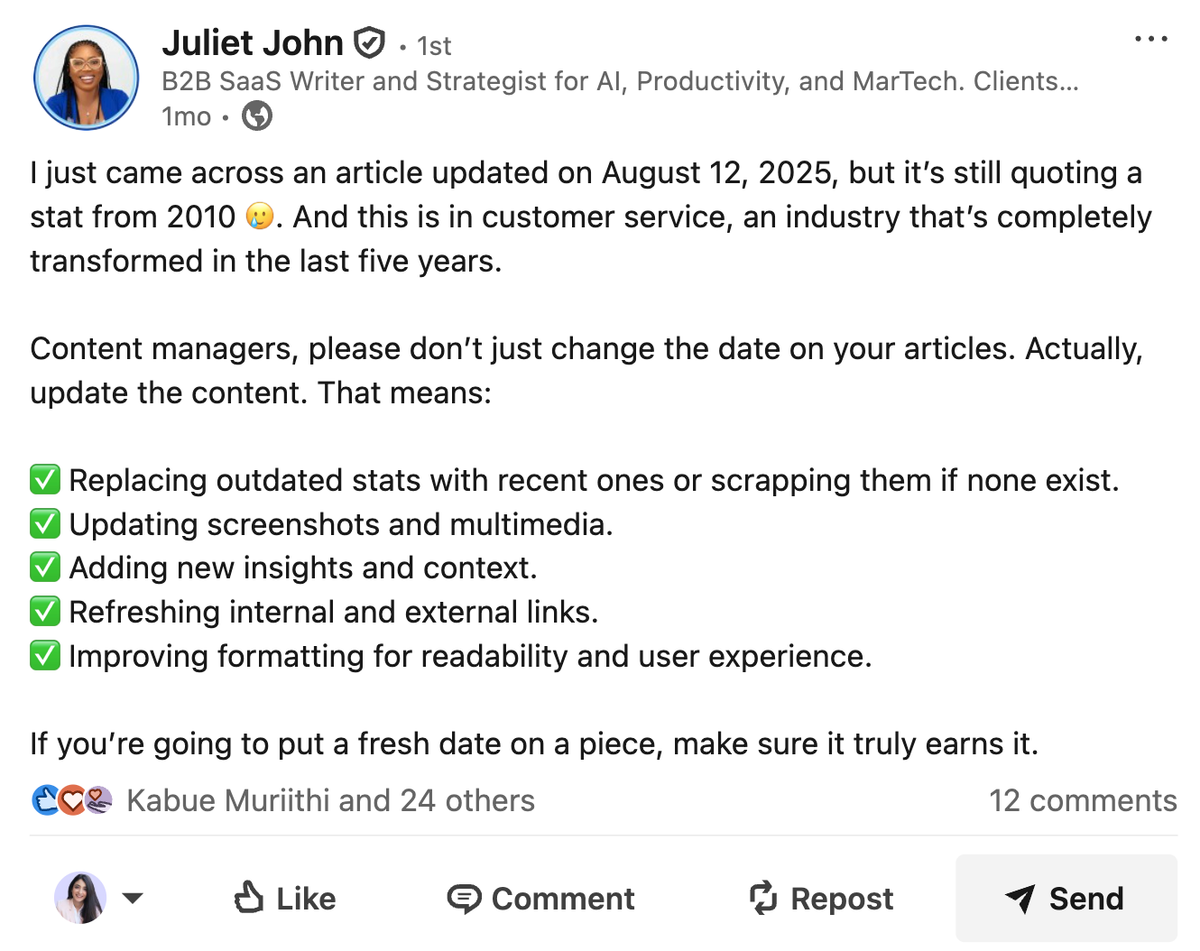
Outdated content creates a rabbit hole of broken trust. When readers spot one outdated fact, they start doubting all the other facts in the piece. They screenshot your old statistics and share them on LinkedIn as examples of lazy content and tell their team to find better sources. The fix starts earlier than the refresh: verify sources at the research stage and there’s less to rot later.
Opportunity cost: Bleeding resources while missing growth
Every hour spent panic-fixing broken content is an hour not spent on strategic initiatives that help you scale your content program without sacrificing quality. Your team scrambles to update statistics instead of launching that new content series.
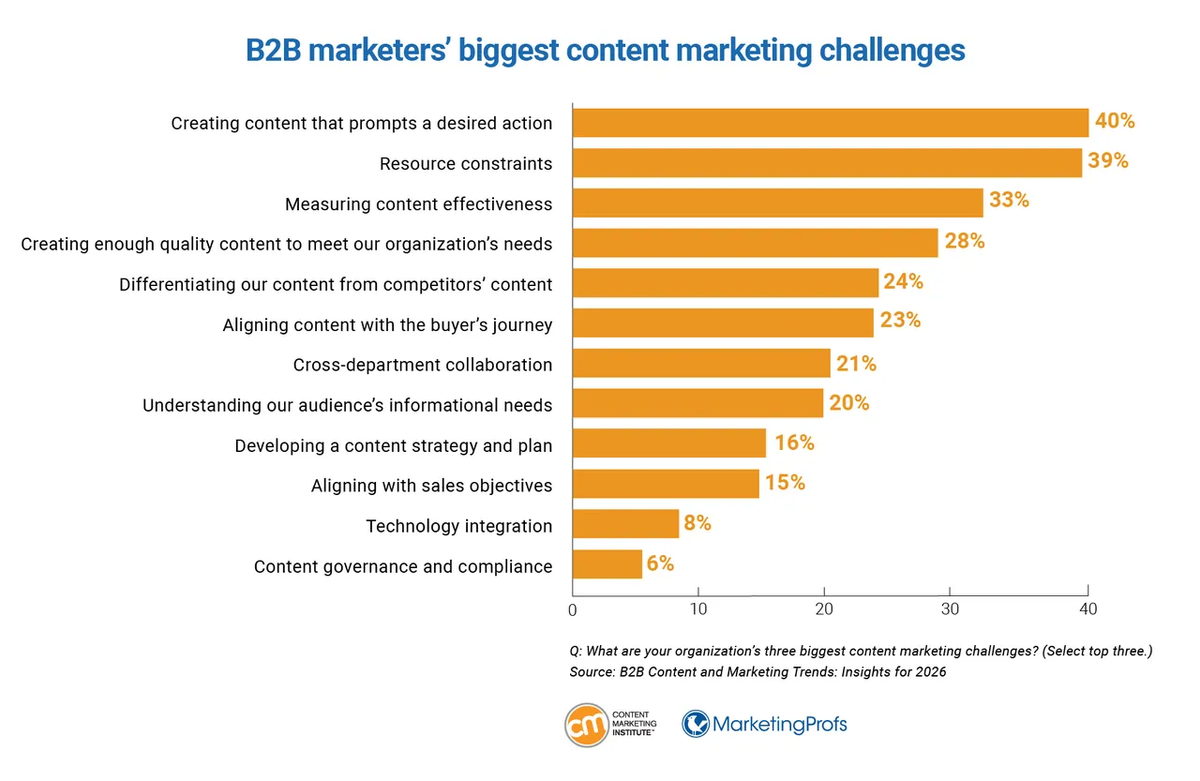
According to CMI’s 2026 B2B Content Marketing Trends report, 39% of marketers cite resource constraints (time, people, and budget) as a top content challenge.
When you’re manually checking hundreds of pages for outdated stats, broken links, and stale claims, you’re burning through exactly the resources you don’t have.
If it takes three hours to audit one outdated post, a 200-post library equals 600 hours of reactive cleanup. That’s 15 full workweeks lost to maintenance that should have been automated.
Why traditional fact-checking fails at scale
Traditional fact-checking was built for a different world, one where sources stayed put and facts had longer shelf lives. Think academic papers, not SaaS blogs.
Whether it’s the CRAPP test used in universities or manual review processes, these methods work fine when you’re evaluating a handful of static sources in a controlled environment.
But content marketing moves too fast for manual verification. Your top-performing articles cite sources that shift constantly:
- Annual industry data with a shrinking half-life
- Pricing, product names, or logos that update without warning
- Legislation that changes in response to real-world events
- Companies that merge, rebrand, or shut down altogether
Traditional fact-checking happens at a single point in time. You verify a source today, mark it as credible, and move on. But what happens three months later when that “recent study” is no longer recent? When that company you cited pivots their entire business model? When those regulations get overhauled?
That polished piece from 2022 might have been perfectly fact-checked when it launched. Every claim verified, every source vetted. But now three of its key facts are outdated, and you only discover the decay after rankings fall or a sales rep flags a complaint during a client call.
Static evaluation tools can’t support continuous accuracy across a growing content library with shifting references, statistics, and claims.
The problem compounds when you consider that 28% of B2B marketers already struggle with creating enough quality content to meet their organization’s needs. Now imagine adding manual fact-checking to that workload: checking every stat, verifying every source, updating every outdated claim across hundreds of pages.
What you need is to build content systems with AI that monitor quality over time.
RECEIPTS: the framework built for content health
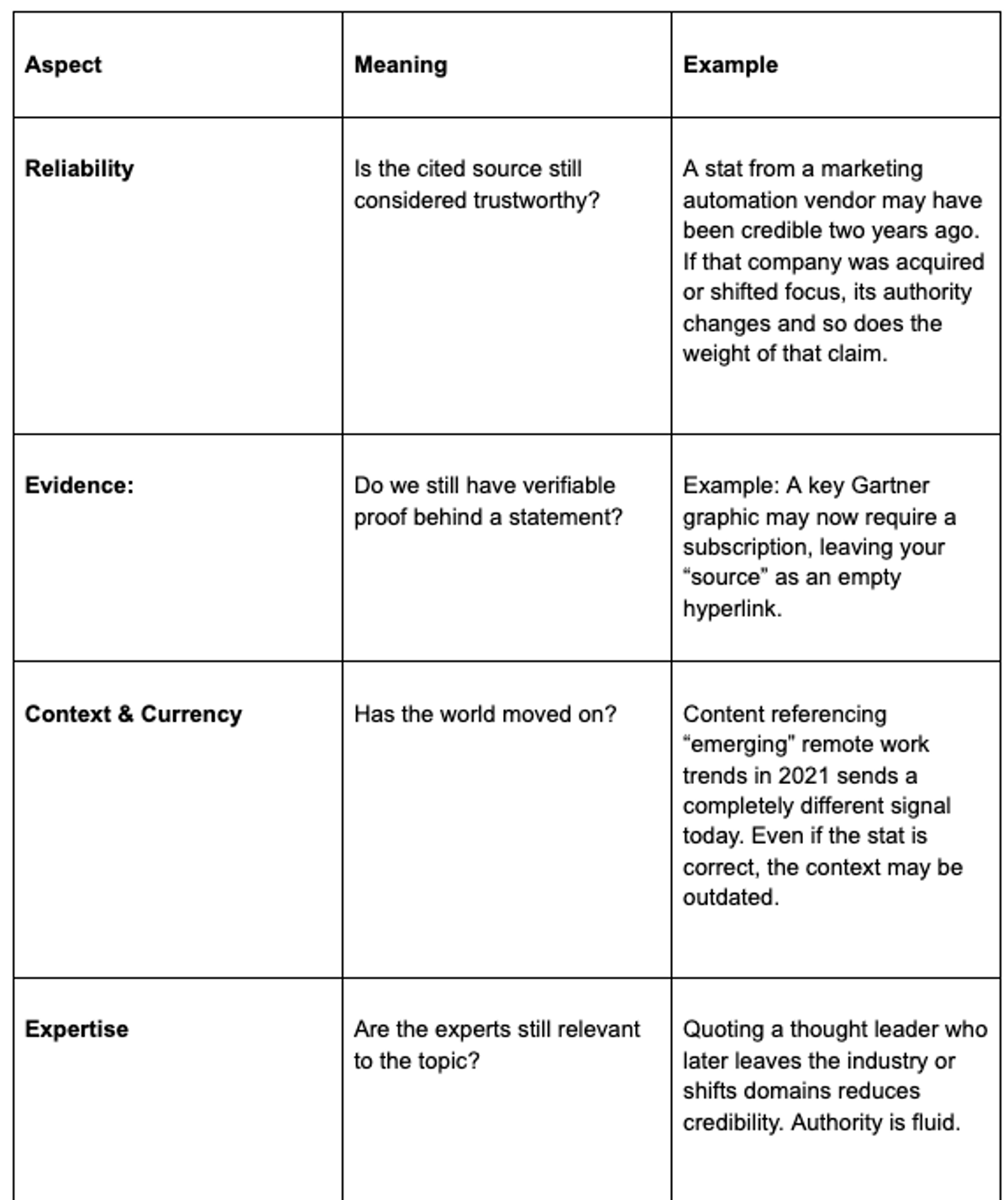
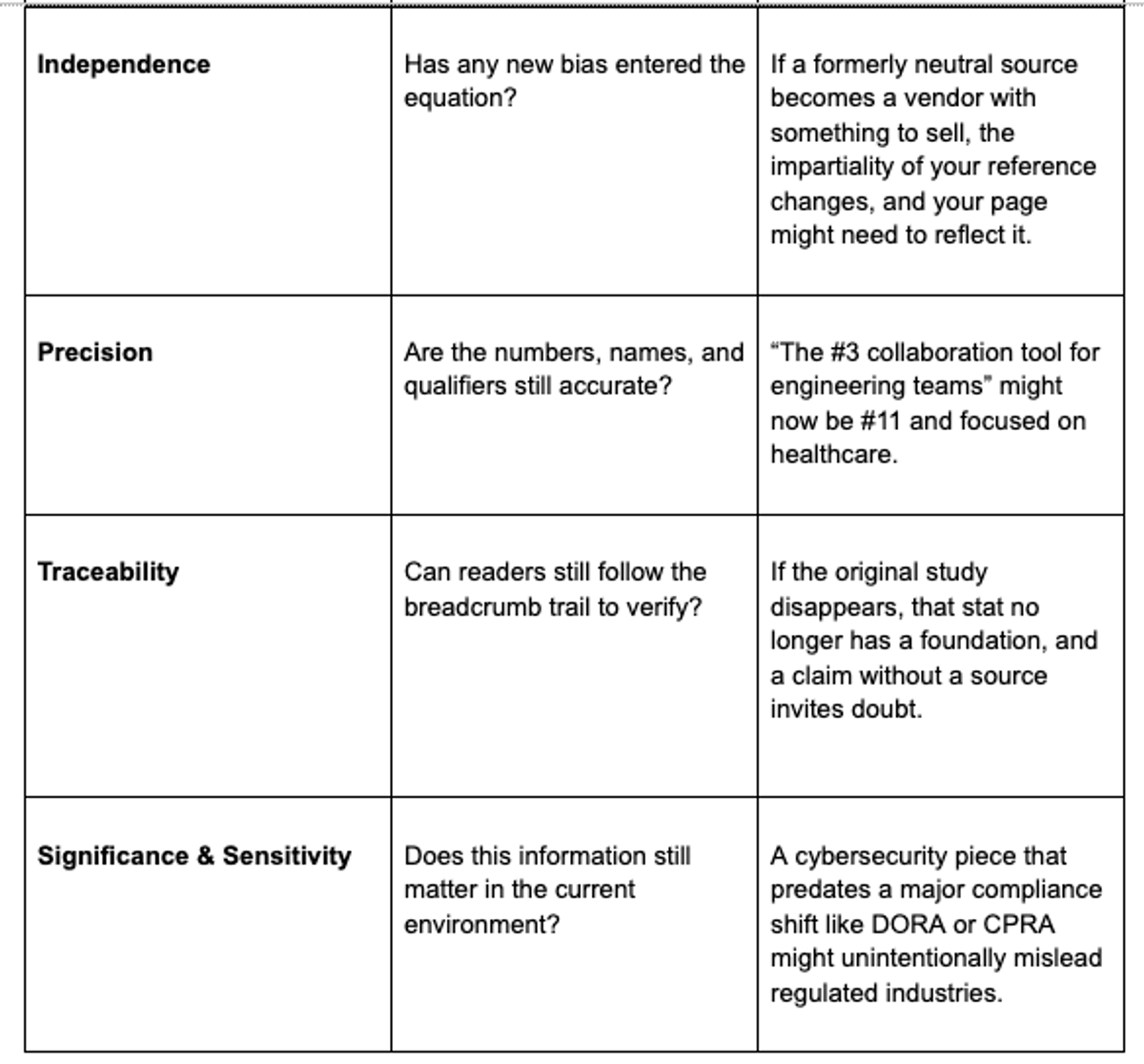
RECEIPTS stands for Reliability, Evidence, Context & Currency, Expertise, Independence, Precision, Traceability, and Significance & Sensitivity.
It turns static fact-checking into a continuous, AI-driven audit that detects, scores, and prioritizes content risk before readers (or Google) notice.
Here’s what it includes:
Catch outdated content before your readers do.
Relato's Fact-Checker Agent takes a page you are worried about, finds the primary source behind each claim, and tells you which to keep, revise, or remove.
How the Fact-Checker Assistant makes RECEIPTS scalable
Running the RECEIPTS framework manually makes sense when your blog has ten or twenty pieces. You can open each one, check sources, verify stats, and confirm that nothing’s gone stale.
But once you’ve been publishing consistently for a few years, that same process becomes unmanageable. A content library of 300+ pages means thousands of data points, links, and claims that can quietly expire without warning. By the time you discover one outdated reference, dozens more are already eroding trust and rankings.
That’s why we built the Fact-Checker Assistant at Relato to make RECEIPTS scalable.
Here’s how it works.
1. Paste a URL to start
Begin by dropping a page link into the agent.
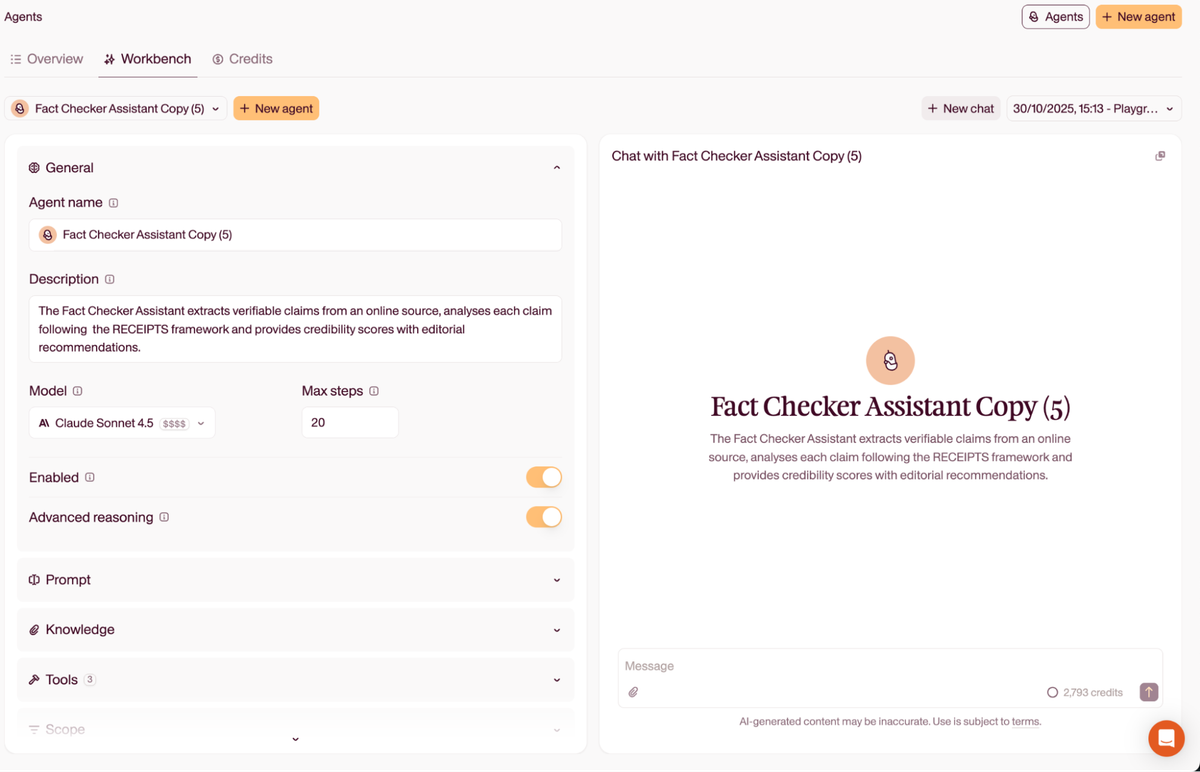
For this preview, I’ve used an article from Toggl on recruiting on Facebook, which was published in 2023 and updated in 2024.
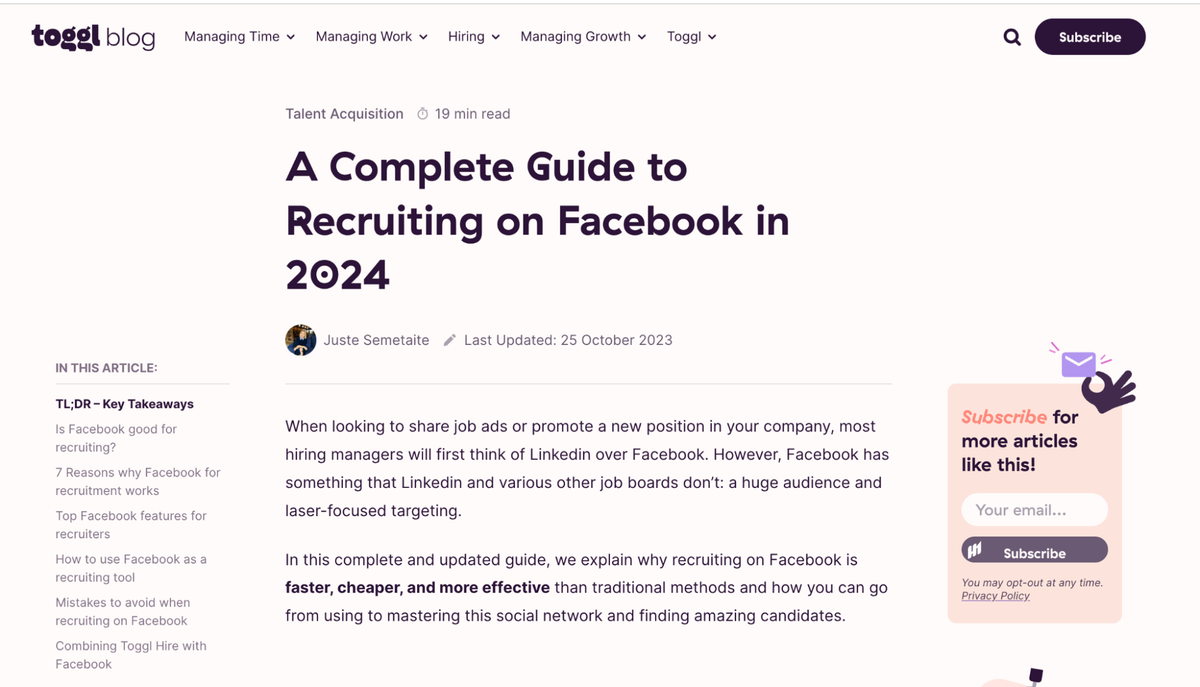
The agent fetches the live version of the article so the review matches what readers see. Working from the live page keeps the findings accurate.
2. The agent pulls the content and extracts verifiable claims
After it loads the page, the agent looks for statements it can check: counts, percentages, monthly actives, rankings, prices, named entities, dates, and cause-and-effect claims. This is where you use AI for research to verify facts at scale rather than relying on manual spot-checks. It ignores opinion and setup language.
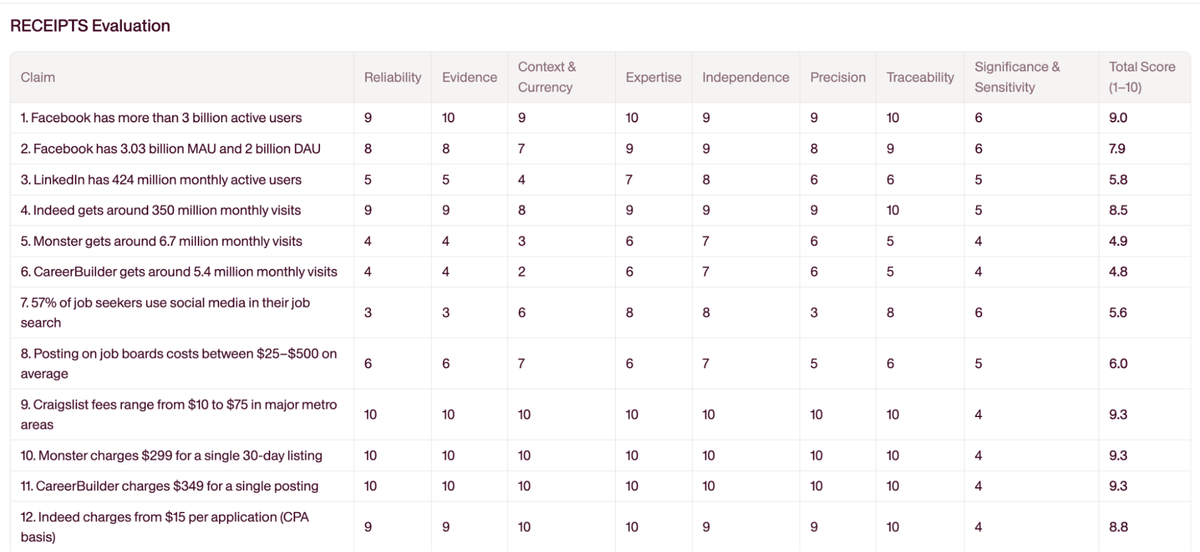
The agent conducts research on each claim to locate primary sources.
3. Each claim is scored against RECEIPTS
For every claim, the agent scores it across all eight RECEIPTS elements, on a 1 to 10 scale, then averages them.
The numbers make risk visible. For example, the Facebook claim scores 9.0 overall with high marks for Evidence and Traceability, which suggests it’s still solid. By contrast, older traffic estimates for Monster and CareerBuilder score under 5, with low Context & Currency and Precision.
You don’t have to debate which one to fix first since the scores point you there.
4. You get an “Editorial Advice” view tied to each claim
Next, the agent translates the scores into an action and adds notes with links. Actions are simple:
- Keep as-is
- Revise
- Remove or update
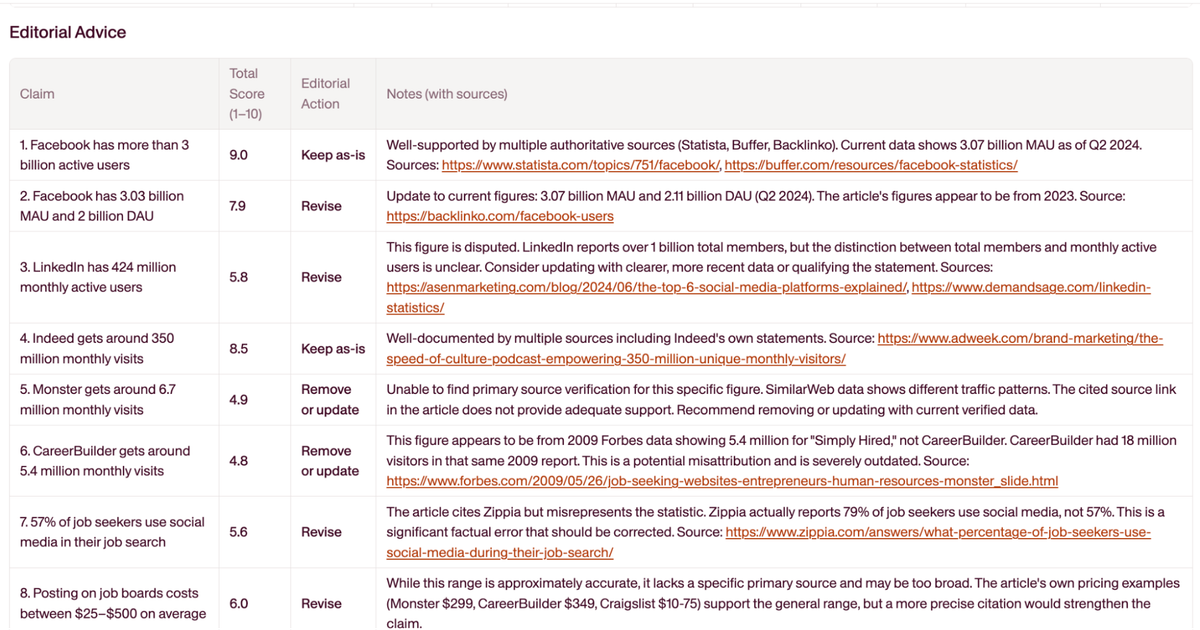
The editorial actions shorten the path from “this might be off” to “here is what to do.” For example, “Facebook has more than 3 billion active users” is marked Keep as-is with multiple supporting sources. “LinkedIn has 424 million monthly active users” is marked Revise with context about total members vs. monthly actives and suggested sources.
For the Monster/CareerBuilder items, the advice is to remove or update with a pointer that the original figures are from a 2009 Forbes piece and likely misattributed. Editors don’t have to hunt for replacements since the notes give starting points.
5. Prioritize and ship updates
Because every claim carries a total score, you can sort the page’s issues (or multiple pages) and handle the highest-risk items first. “High-risk” in practice tends to be low Context & Currency (time-sensitive), low Evidence/Traceability (no source trail), or high Significance & Sensitivity (facts that change legal, financial, or product guidance).
You avoid spending an afternoon polishing safe claims while the misleading ones continue to cost you trust and rankings.
6. Rinse and repeat across the library
Run the same flow on the next URL, or queue a set of important pages. Scheduling that queue is one of the jobs a content operations platform exists to do, so refreshes happen on a cadence instead of when somebody notices a ranking slide. The steps don’t change, which is the point. RECEIPTS becomes a routine instead of a one-off audit.
Put simply, the agent gives you: a clean list of checkable facts, a common yardstick to score them, and clear next steps with sources. The two tables are easy to read, easy to sort, and they move you from “we think something’s outdated” to “here are the five edits you need to prioritize and the links to back them up.”
Building your content health system with the Fact-Checker Agent
The Fact-Checker Agent shows what’s outdated, what’s solid, and what needs attention. But that visibility only matters if you turn it into a routine. One-off runs might fix a few broken links or stale stats, but they won’t stop new decay from building up behind the scenes.
The goal is to avoid over-reliance on AI for content creation while using it for verification and maintenance, the tasks humans shouldn’t waste time on.
To keep your library healthy, RECEIPTS has to move from being a checklist to being a system. That means putting guardrails around how you use sources, when you review them, and how you act on what the agent finds.
Train the agent with your industry’s source hierarchy
The agent learns from the examples you give it. Feeding it a mix of high-quality sources from your own field teaches it what “credible” looks like. For example, in healthcare, that might mean PubMed IDs, peer-reviewed journals, or government health databases, or in finance, think SEC filings, central bank reports, and major index providers.
Including these examples in your prompts helps the agent weigh those sources more heavily than generic blog posts or SEO content. Over time, it starts recognizing patterns of authority and prioritizes verified expertise instead of keyword-stuffed articles that only look relevant on the surface.
Use claim extraction as your content quality diagnostic
The number and type of claims the agent extracts act as a quick health check for your content. A 2,000-word article with only one or two verifiable claims is probably surface-level commentary wrapped in filler. On the other hand, if the agent pulls 30 or more claims, the piece might be overloaded with stats, comparisons, and citations that bury the main argument.
Aim for a balanced signal: enough concrete, verifiable information to show authority, but not so much that the reader drowns in data.
Build a source verification workflow
When the agent recommends a secondary source, like a blog post referencing a study, follow the breadcrumb trail back to the original. Phrases such as “according to research” or “a study found” usually point to the real data hiding behind a link or paywall.
Verifying the primary source helps you confirm that the numbers weren’t paraphrased or taken out of context. Once you find it, add that original URL to your next prompt as a preferred citation. Over time, this trains the agent to prioritize first-party evidence instead of recycled or secondhand references.
Set source quality standards before you start
Before you run any checks, decide what counts as a credible source in your world. Create a simple hierarchy:
- Primary research, government databases, and peer-reviewed journals at the top
- Reputable industry reports and first-party data in the middle
- Marketing blogs and opinion pieces at the bottom
Adding this hierarchy to your prompt gives the agent clear guardrails and it learns to pull from original or verified material rather than recycled takes. You avoid wasting time fact-checking “sources” that turn out to be thought-leadership posts repeating someone else’s work.
Create a quarterly audit schedule based on content value
An audit schedule keeps your highest-impact pages fresh without turning maintenance into a full-time job. If you have never inventoried the library, the content audit step in a B2B content strategy is the place to start, because you cannot schedule a review of pages you have not listed. Here’s some guidance on what to prioritize when:
The top 10% are your money pages that drive conversions or steady organic traffic. For a SaaS company, that might be feature comparison posts, pricing pages, or core “how it works” guides. Run RECEIPTS on these every quarter, so no outdated claim costs you leads.
Your middle 60% might include evergreen educational content or product-adjacent topics that build authority over time, think “best practices” articles or workflow explainers. A twice-yearly audit is enough to catch shifting data or emerging trends.
Finally, the bottom 30% are low-traffic or legacy pieces like event recaps, early case studies, or archived blogs. Check these once a year, unless a regulation or product update directly affects them.
A staggered cadence prevents audit fatigue while keeping your most visible content accurate and trustworthy.
How to spot decaying content using Ahrefs and ChatGPT
Before any of this becomes a system, you have to find the pages worth looking at. Most teams already own the two tools that do it, and the mistake is asking one tool to do the whole job. Ahrefs and Search Console tell you which pages are sliding. A language model helps you work out what went stale inside them. Neither answers the other’s question.
Step 1: Find the losers in Ahrefs
Open Site Explorer, go to the Top pages report, and set the compare filter to a matching period a year earlier. Ahrefs will show traffic, keyword and position changes between the two windows, and you can sort by the change values to bring the biggest losses to the top.
Compare like for like. Month against the same month a year ago beats month against last month, because it takes seasonality out of the picture rather than dressing it up as decay.
Step 2: Read the shape of the loss in Search Console
Ahrefs gives you an estimate. Search Console gives you what actually happened, so use it to check the diagnosis. Open the Performance report, filter to the URL, and compare the two date ranges so the table shows a difference column for clicks, impressions, CTR and average position. Google suggests weekly or monthly granularity for this, which stops day-of-week noise reading as a trend.
The split between clicks and impressions is the diagnosis:
| What you see | What it usually means | What to do |
|---|---|---|
| Impressions down, position down | You lost ranking. Something outranked you. | Refresh the substance, not the date |
| Impressions flat, clicks down | The results page changed around you, or your title stopped matching intent | Rewrite the title and description first |
| Impressions up, clicks flat | You are ranking for queries the page does not answer | Add the missing section, or split the page |
| Both down sharply on one date | A site change or an algorithm update, not gradual decay | Check what you shipped that week |
Only the first row is decay in the sense this article means. The others need a different fix, and treating them all as “refresh the post” is how teams burn a quarter updating pages that were never stale.
Step 3: Use ChatGPT for claim extraction, not for verification
Once you have a shortlist, paste the page in and ask for the checkable claims only: numbers, dates, prices, named companies, and cause-and-effect statements, with the source each one leans on. Ask it to skip opinion and setup language. That is a genuinely tedious reading job and a model is fast at it.
Then stop and check its output yourself.
A language model will hand you a replacement statistic, with a plausible publisher and a plausible year, that does not exist. It is not lying so much as completing a pattern, and the failure looks exactly like the success. The extraction is the useful part. The verification has to touch a real source, which is the whole reason primary sources beat second-hand citations in this workflow.
That gap, between what the model finds and what someone has actually confirmed, is what the RECEIPTS scoring below is for. It is also why the Fact-Checker Agent goes and researches each claim instead of asking a model to remember it.
How to train your team to spot content decay early
The Fact-Checker Agent scores claims for you, but the people closest to your content still need to recognize decay before a report flags it. Train your team to catch it early and the quarterly audit becomes a backstop instead of your only line of defense.
Start with the four signals that show up first:
- A ranking that slid. A page that sat at position 3 and now sits at position 7 is usually losing relevance, not luck. Pull the query in Search Console and read the page as a stranger would.
- A stat with a year in it. Any number tied to “2021” or “last year” has a shelf life. Teach writers to flag dated figures the moment they reread them, not when a reader complains.
- A named company or product. Tools get acquired, rebranded, or shut down. A mention that was accurate at publish can quietly turn wrong.
- A claim that starts with “recent.” “A recent study” ages badly. If the source is three years old, the word is doing the damage.
Then give the habit somewhere to live. Add a decay check line to your editorial SOP so every writer scans for these signals before they touch a draft. Run a fifteen-minute review of your top ten pages at the start of each month, and let anyone on the team open the Fact-Checker on a URL they suspect rather than waiting for the quarterly strategy check-in. Catching one stale stat in week one is cheaper than rewriting a buried page in month six.
You are not trying to turn writers into auditors. You want decay to become something the team notices in passing, the way you notice a typo, so the agent handles scale and the people handle judgment.
Content decay is inevitable, but the damage isn’t
Every piece of content ages: data shifts, sources break, context fades. That’s unavoidable. What you can control is how fast you catch it.
RECEIPTS gives you a living framework for accuracy; the Fact-Checker Assistant makes it scalable. Together, they keep your content healthy, your reputation intact, and your SEO performance compounding, not decaying.
Run your first audit today and see what your readers (and search engines) will thank you for tomorrow.
Frequently asked questions about content decay
What is content decay?
Content decay is the slow loss of traffic and rankings on a page that has not changed, because the world around it has. Statistics get superseded, tools get acquired or renamed, regulations move, and cited sources go dead. The page reads the same as the day it shipped, but it answers the query less well than the pages that have kept up, so it drifts down the results and the clicks follow.
How do I spot decaying content using Ahrefs and ChatGPT?
Use them for different jobs. In Ahrefs, open Site Explorer, go to Top pages, set the compare filter to the same month a year earlier, and sort by traffic change to find the pages losing the most. Then confirm in Search Console: compare the same two date ranges filtered to that URL, because impressions holding while clicks fall points at a changed results page rather than a lost ranking. Only then paste the page into ChatGPT and ask it to list every checkable claim with its date and source, ignoring opinion. Treat that list as things to verify, not answers, because a language model will produce a confident replacement source that does not exist.
How do I train my team to spot content decay early?
Teach them the signals that show up first: a ranking that slipped a few positions, a statistic tied to an old year, a named company or tool that may have been acquired or renamed, and any claim that opens with “recent.” Add a short decay check to your editorial SOP so writers scan for these before touching a draft, and let anyone run the Fact-Checker on a URL they suspect instead of waiting for the quarterly audit.
How often should I audit content for decay?
Match the cadence to the value of the page. Audit your top 10% of pages, the ones driving conversions or steady traffic, every quarter. Review the evergreen middle 60% twice a year. Check low-traffic or legacy pieces once a year, unless a product change or new regulation affects them directly. A staggered schedule keeps your visible content accurate without turning maintenance into a full-time job.
What is the difference between content decay and content rot?
They describe the same problem from two angles. Content decay is the slow loss of rankings and relevance as the facts in a page age. Content rot is what readers experience when they hit that outdated information and lose trust. One is the cause, the other is the effect, and both are fixed the same way: catch the stale claim before it costs you.
What causes content decay?
Content decays when the world moves and the page does not. Statistics get superseded, companies merge or rebrand, regulations change, and sources go dead. Google reads the staleness as a quality signal and lowers the page, while readers who spot one old fact start doubting the rest. Nothing about the page changed; the context around it did.
Stop content decay before it spreads.
Relato's Fact-Checker Agent checks a page's claims against their primary sources, so you can work through the pages that matter most.